ai-implementation
Kubernetes in 4 Hours: How AI Agents Are making us Jack of All Trades
Dec 8, 2025

The Confession - I've been trying to learn Kubernetes for months.
I have a real-time platform running on raw Docker containers across four bare-metal Ubuntu servers. It worked. Barely. Docker Compose files held together with hope and restart: always. No orchestration. No self-healing. No proper networking between services. One server reboot and I’m SSH-ing to manually restart Kafka.
Kubernetes isn’t hard. It’s brutally, soul-crushingly, documentation-that-assumes-you-already-know-Kubernetes hard.
What I need is the equivalent of a senior DevOps/SRE partner—someone who can reason through the problem with me, ask the right architectural questions, surface trade-offs, and help shape a robust productionization strategy.The goal isn’t to throw manifests over the wall; it’s to build a shared mental model of how this service should behave in a real production
Four hours later, I had a production-ready architecture, 1,200 lines of documentation, and a network validation script.
The Task: 4 Servers, 4 Hours, 1 AI Agent (My Co CTO Claude Code)
I had four bare-metal Ubuntu servers. The goal: turn them into a production-ready Kubernetes cluster for my real-time AI platform.
The Traditional Path:
Read 47 blog posts with conflicting advice
Follow a tutorial written for K8s 1.18 (we're on 1.31)
Debug networking for 3 days
Give up, pay for EKS, cry about the bill
The AI Agent Path:
Open Claude Claude
Start brainstorming
Have a working architecture in 4 hours
Here's what happened.
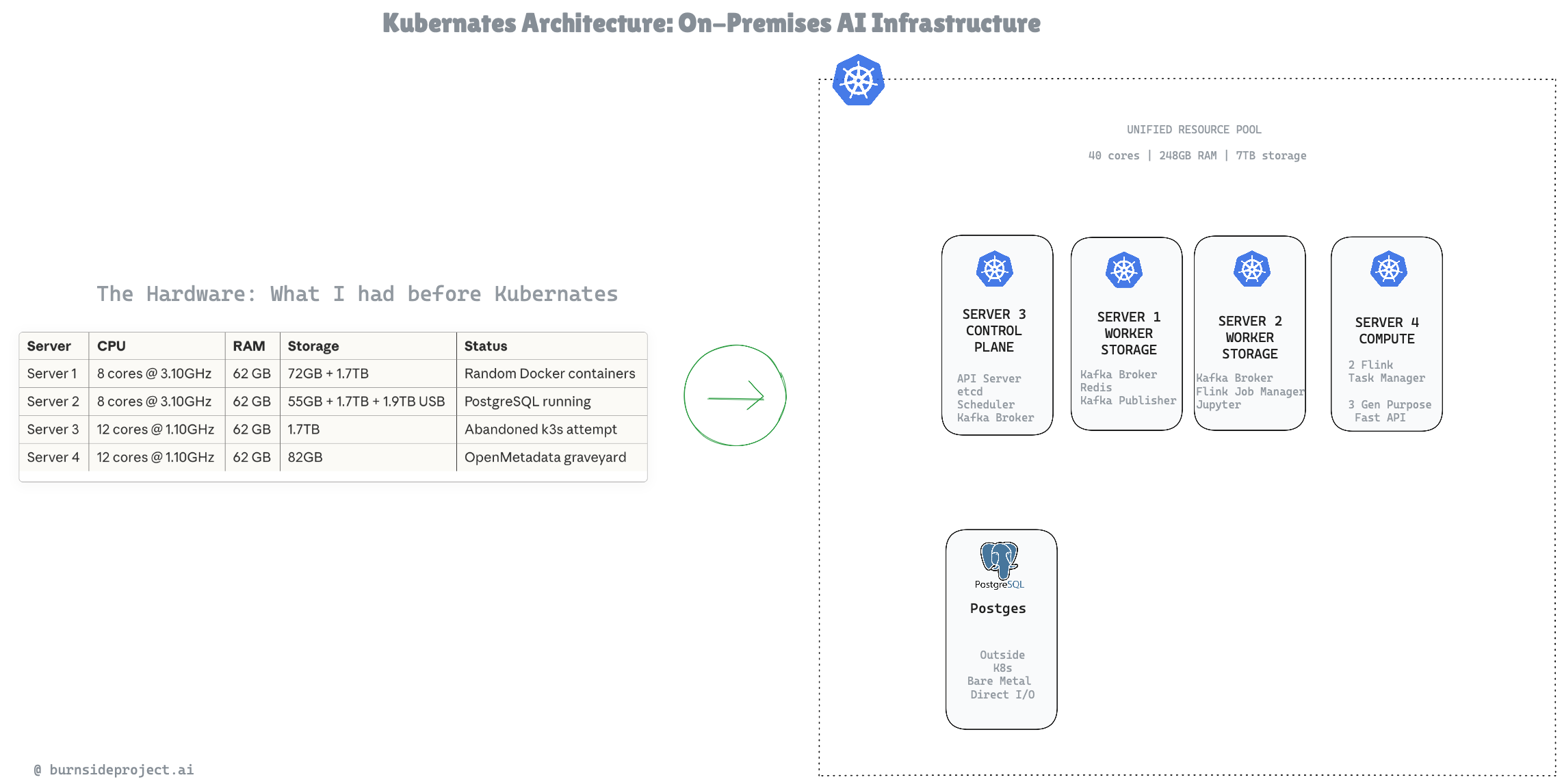
The Hardware: What I Was Working With
Server CPU RAM Storage Status
Server 1
8 cores @ 3.10GHz
62 GB
72GB + 1.7TB
Random Docker containers
Server 2
8 cores @ 3.10GHz
62 GB
55GB + 1.7TB + 1.9TB USB
PostgreSQL running
Server 3
12 cores @ 1.10GHz
62 GB
1.7TB
Abandoned k3s attempt
Server 4
12 cores @ 1.10GHz
62 GB
82GB
Nothing Useful Running
Combined Resources:
40 CPU cores
248 GB RAM
~7 TB storage
100% chaos
My first instinct: "I'll put Kafka on Server 1, Flink on Server 2..."
Claude's response changed everything.
The Mental Model That Changes Everything
Me: "So each server will hold one backend app like Flink or Kafka?"
Claude: "You're NOT creating 4 isolated servers with 1 app each. You're creating ONE CLUSTER with 40 cores, 248GB RAM, 7TB storage that intelligently places workloads based on capacity, labels, and placement rules."
This is what months of documentation never taught me.
Traditional Thinking:
Server 1 = Kafka
Server 2 = Flink
Server 3 = Redis
Server 4 = FastAPI
Result: Stranded resources, single points of failure, manual scaling.
Kubernetes Thinking:
RESOURCE POOL: 40 cores | 248GB RAM | 7TB storage
Scheduler asks:
How much does this workload need?
Which nodes have capacity?
Are there placement preferences?
Place it optimally
Four servers become one computer. That's the point.
The Architecture: From Chaos to Clarity
After 3 hours of iterative brainstorming, we had this:
Key Decisions Made in Minutes (Not Days):
The Code That Actually Matters
Node Labels: Guided Placement
bash
# Storage-heavy nodes (Kafka, databases)
kubectl label node server1 storage-tier=high kafka-eligible=true
kubectl label node server2 storage-tier=high kafka-eligible=true
kubectl label node server3 storage-tier=high kafka-eligible=true
# Compute-heavy nodes (Flink TaskManagers)
kubectl label node server4 workload-type=compute storage-tier=low
Workload Placement: Kafka Wants Storage
yaml
# Kafka broker scheduling
spec:
affinity:
nodeAffinity:
requiredDuringSchedulingIgnoredDuringExecution:
nodeSelectorTerms:
- matchExpressions:
- key: storage-tier
operator: In
values: ["high"]
podAntiAffinity:
requiredDuringSchedulingIgnoredDuringExecution:
- labelSelector:
matchLabels:
app: kafka
topologyKey: kubernetes.io/hostname
Translation: "Put Kafka on nodes with storage. Never put two brokers on the same node."
I would have spent a week figuring this out from docs. Claude explained it in 30 seconds.
Network Validation: The Script That Saves Hours
bash
#!/bin/bash
# Pre-flight checks before touching kubeadm
# Test 1: Can all nodes see each other?
for node in "${NODES[@]}"; do
ping -c 3 "$ip" && echo "✅ $name reachable"
done
# Test 2: Is latency acceptable for etcd consensus?
# Want <1ms on same switch
ping -c 10 "$target" | tail -1 | awk -F'/' '{print $5}'
# Test 3: Bandwidth for Kafka replication
iperf3 -c $target -t 5 # Need 900+ Mbps
# Test 4: Kernel modules loaded?
lsmod | grep -q "br_netfilter" || echo "❌ BLOCKER"
# Test 5: Swap disabled?
free -m | awk '/^Swap:/ {print $2}' # Must be 0
Run this BEFORE kubeadm. I cannot stress this enough. Networking issues in Kubernetes are the #1 reason for mysterious failures, and they're the hardest to debug after the fact.
The Deliverables: 4 Hours of Work
ArtifactLinesPurposeREADME.md1,200+Complete architecture documentationvalidate-network.sh400+Pre-flight network checksconfig.env150+All configuration centralized
What's in the README:
Full ASCII architecture diagrams
Resource allocation per node
Workload placement matrix
Data flow diagrams (SDK → Kafka → Flink → PostgreSQL)
Networking topology
Storage strategy (Longhorn for replication, local-path for speed)
DNS and ingress routes
Troubleshooting guide
This would have taken me weeks to figure out and document. I had it in an afternoon.
Why AI Agents Change Everything
Here's the uncomfortable truth:
Kubernetes isn't actually that hard. The concepts are logical. Pods, Services, Deployments, StatefulSets—they make sense once you understand them.
The documentation is what's hard. It's written by experts for experts. It assumes context you don't have. It links to other docs that assume even more context. You spend 80% of your time figuring out what question to ask, not finding the answer.
AI agents flip this completely.
Traditional Learning:
Read docs → Don't understand → Google it → Find outdated answer →
Try it → Fail → Debug → Find different outdated answer → Repeat
AI Agent Learning:
Describe what you want → Get contextual explanation →
Ask why → Get deeper explanation → Build iteratively
The agent meets you where you are. It explains at your level. When you ask "but why?" it goes deeper. When you say "I don't care about that" it moves on.
The Walls Are Coming Down
I used to think there were clear roles:
Developers write application code
DevOps handles infrastructure
Data Engineers build pipelines
Platform Engineers manage Kubernetes
These walls exist because the tooling was too complex for anyone to master everything.
AI agents are demolishing these walls.
A developer who can brainstorm with Claude can now:
Design Kubernetes architectures
Write Terraform modules
Build CI/CD pipelines
Optimize Flink jobs
Debug networking issues
Not because they suddenly learned all these skills. Because they have an expert collaborator available 24/7 who can fill the gaps.
This doesn't replace specialists. Complex production systems still need deep expertise. But it means:
Developers can own more of the stack
Specialists can move faster with AI augmentation
Small teams can punch above their weight
The barrier to entry for infrastructure drops dramatically
The Future: What Happens Next
When my EPYC server arrives in a few weeks, adding it to the cluster is three commands:
bash
# 1. Prepare the node
./prepare-node.sh
# 2. Get join token
kubeadm token create --print-join-command
# 3. Join
kubeadm join <control-plane>:6443 --token <token> ...
Cluster goes from 40 cores to 104 cores. No rebuild. No reconfiguration. Just more capacity in the pool.
That's the architecture we designed in 4 hours. Production-ready. Expandable. Documented.
The Takeaway
Kubernetes isn't the enemy. Inaccessible knowledge is the enemy.
For years, DevOps skills have been gatekept behind:
Tribal knowledge
Outdated documentation
Expensive certifications
"You just have to struggle through it"
AI agents break this open. Not by doing the work for you, but by being the mentor you never had.
I've spent months failing at Kubernetes. I spent 4 hours succeeding with Claude.
The math speaks for itself.
Resources
What We Built:
4-node bare metal Kubernetes cluster
Kafka (KRaft) with 3 brokers
Flink with 2 TaskManagers
Redis for caching
3 FastAPI services
JupyterHub for analytics
Full monitoring stack
Time Investment:
Traditional approach: 2-4 weeks (conservative)
AI-assisted approach: 4 hours
My Setup:
Claude (agentic coding mode)
4 Ubuntu 24.04 servers
Coffee
Willingness to ask "dumb" questions
Building AI infrastructure on a budget? Check out my previous post on building a $2,089 ML workstation that replaces $18K/year in cloud costs.