ai-implementation
The Cloud Bill That Breaks Startups: A Survival Guide
Nov 17, 2025
Every AI startup faces the same brutal economics: You need to validate your models before raising serious capital, but cloud GPU costs will burn through your runway before you prove product-market fit.
We hit this wall hard. Our real-time ML platform needed:
For a pre-seed startup, that math doesn’t work. We had two choices:
After pricing out every hyperscaler and exploring alternatives like Lambda Labs and RunPod, we made a controversial decision: build production-grade AI infrastructure on commodity hardware.
Not a prototype. Not a “good enough for dev” setup. Production-grade.
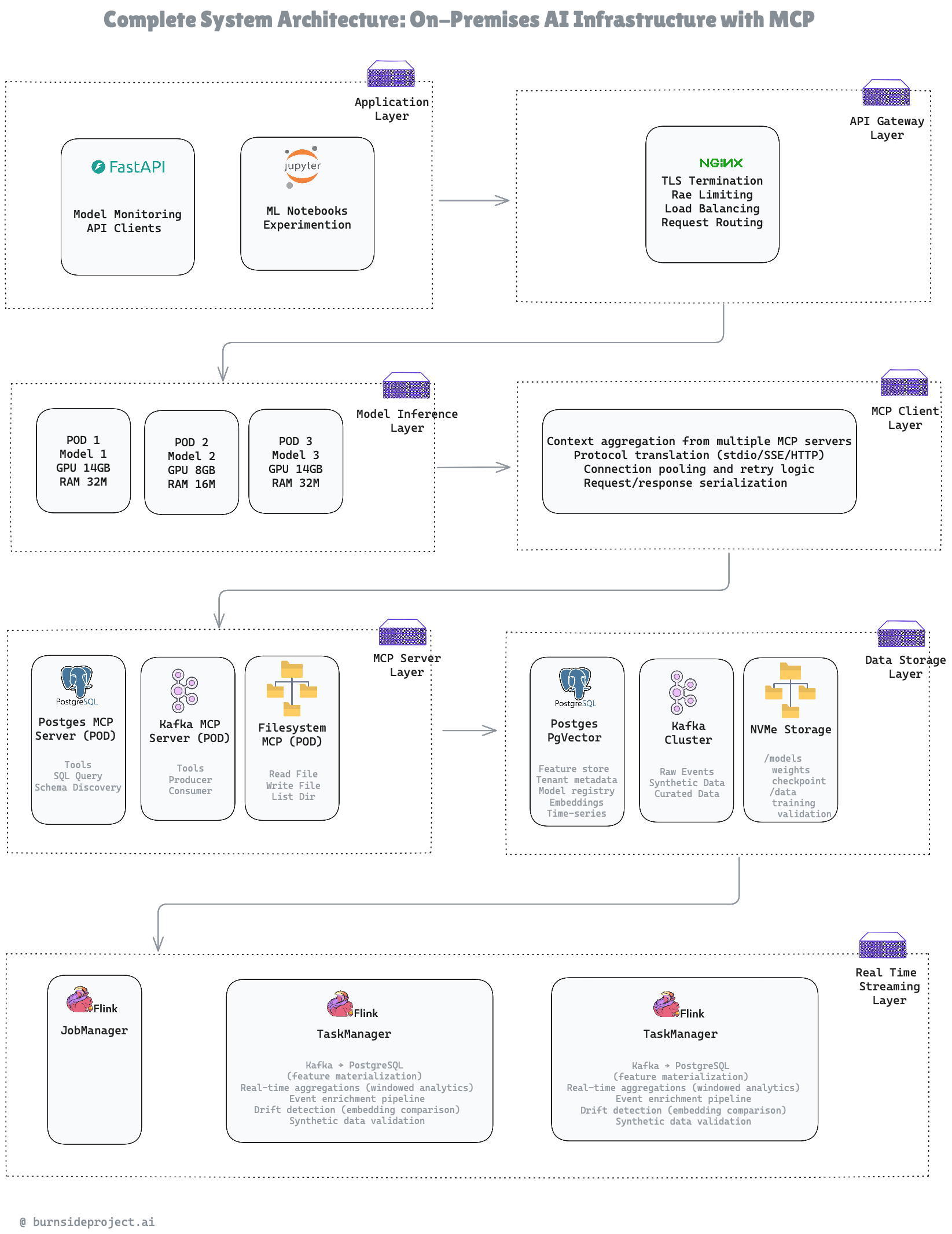
Our seven-layer architecture: Application → API Gateway → Model Inference → MCP Abstraction → Data Storage → Streaming Processing
Component Decisions:
CPU - AMD Ryzen 7 7700X (8C/16T @ 4.5GHz)
High single-thread for Python workloads
$255
RAM
128GB DDR5- 5600 Critical for 70B models in-memory
$699
GPU
ASUS Dual GeForce RTX™ 5060 Ti 16GB
GDDR7 OC Edition (PCIe 5.0, 16GB
$477
STORAGE
WD_BLACK 2TB SN7100 NVMe SSD
Internal Solid State Drive - Gen4 PCIe, M.2
$175
WD_BLACK 1TB SN7100 NVMe SSD
Internal Solid State Drive - Gen4 PCIe
$85
PSU
CORSAIR RM850x Fully Modular Low-Noise ATX Power Supply
$134
Case + Cooling
CORSAIR 4000D RS Frame Modular High Airflow
$100
Motherboard
ASUS TUF GAMING B650-PLUS WIFI AMD B650 AM5 Ryzen
$164
Total: $2,089
Key Decision: 128GB RAM was non-negotiable. You cannot run 70B parameter models without massive system memory for context caching and prompt processing. We almost made the mistake of going with 64GB to save $250—that would’ve crippled us.
Here’s where it gets interesting. Hardware is commodity—anyone can buy parts. The real innovation is Model Context Protocol (MCP) integration.
The Old Way (Tech Debt Guaranteed)
Key Decision: MCP isn’t just an abstraction—it’s an insurance policy. When we migrate to AWS/GCP/Azure, our models don’t know or care. They still call the same MCP endpoints.
We run three Kubernetes pods with different resource profiles:
Key Decision: 4-bit quantization was mandatory. FP16 would require 140GB VRAM (impossible on consumer GPU). GPTQ maintains 95% of model quality while fitting in 14GB.
Use Case: High-throughput classification, sentiment analysis, entity extraction. When you don’t need reasoning depth, 8B models are 5x cheaper per token.
Use Case: High-throughput classification, sentiment analysis, entity extraction. When you don’t need reasoning depth, 8B models are 5x cheaper per token.
Use Case: Demand forecasting for our restaurant inventory system. Predicts stockouts 7 days in advance with 96% accuracy.
The MCP layer sits between our models and data sources, providing a standardized protocol for context retrieval.
PostgreSQL MCP Server:
Kafka MCP Server:
Key Decision: Three separate MCP servers instead of one monolithic server. PostgreSQL downtime doesn’t affect Kafka access. Isolation = resilience.
Filesystem MCP Server:
Key Decision: Three separate MCP servers instead of one monolithic server. PostgreSQL downtime doesn’t affect Kafka access. Isolation = resilience.
While models handle inference, Flink processes the data pipeline:
Why This Matters: Models need fresh features. Without Flink, we’d be querying stale data from batch jobs that run hourly. Flink gives us sub-2-second feature freshness.
Key Decision: Real-time drift detection saved us from deploying a degraded model. We caught a 0.32 drift score on Day 4 of testing—turns out our synthetic data wasn’t matching production distributions. Without Flink, we wouldn’t have known until customer complaints.
We use four separate storage systems because forcing one database to do everything creates bottlenecks.
Key Decision: Bifurcated storage prevents model loading from competing with database I/O. We tried a single 3TB drive initially—performance tanked when loading new model weights during active inference.
Key Decision: Bifurcated storage prevents model loading from competing with database I/O. We tried a single 3TB drive initially—performance tanked when loading new model weights during active inference.
Per-Inference Cost Breakdown:
At Scale (100K inferences/day):
ROI: 1.2 months (payback period) Year 1 Savings: $20,964
Scalability Path
Key Decision: Linear cost scaling. At 100K/day, we migrate to cloud. Below that threshold, on-prem wins by 18x.
The Mistake We Almost Made:
We initially spec’d 64GB RAM to save $250. Then we actually tried loading Llama 3.1 70B (4-bit quantized):
With 128GB:
Lesson: Don’t skimp on RAM for LLM inference. It’s the difference between “works” and “crashes under load.”
The Problem with Traditional Connectors:
Every model framework (vLLM, TensorRT-LLM, Ollama) has its own way of loading data:
MCP Way:
Lesson: The migration will happen. MCP ensures it’s a config change, not a code rewrite.
Lambda Limitations:
Flink Advantages:
Lesson: Stream processing needs stateful operators. Lambda is stateless by design.
The Single-Database Trap:
We initially tried PostgreSQL for everything:
Purpose-Built Storage:
Lesson: Don’t force one database to do everything. Use the right tool for each job.
Realism Check:
But reality includes:
P99 latency: 220ms P99.9 latency: 3,500ms (cold start scenarios)
With a 200ms SLO, we’d violate 0.1% of the time (1 in 1,000 requests). With a 5-second SLO, we violate 0.01% of the time (1 in 10,000 requests).
Lesson: Set SLOs with safety buffers. Reality is messier than benchmarks.
Week 1 Mistake:
We assembled everything, ran inference tests, and saw great performance: 25 tokens/sec on Llama 70B.
Week 2 Reality:
After 6 hours of continuous load:
Solution:
Lesson: Benchmark under continuous load, not just burst tests.
Initial Setup:
Production Reality:
Under load, we saw:
Solution:
Lesson: Network is a bottleneck. 1GbE is not enough for multi-service inference workloads.
The Problem:
Each Flink TaskManager opened 20 connections to PostgreSQL. Each model pod opened 10 connections. Each MCP server opened 5 connections.
Total: 75 connections (PostgreSQL default max: 100)
Under load:
All inference stopped. Took us 2 hours to diagnose.
Solution:
Lesson: Monitor connection counts from day one. Set max_connections based on actual service topology.
Week 3 Surprise:
What happened?
Solution:
The Silent Failure:
We built a synthetic data generator that produced 10K events/sec. Schema validation passed. Volume looked great. Shipped it.
Week 2 Discovery:
Drift detection alerted: drift_score = 0.45 (threshold: 0.25)
Root cause:
Models trained on synthetic data performed 20% worse on real data.
Solution:
Drift score dropped to 0.08.
Lesson: Synthetic data is not just about schema. Distributions matter more than you think.
We waited until Week 3 to set up Prometheus + Grafana. Bad idea.
In Week 2, we had mysterious latency spikes (P95: 450ms) and no way to debug. Spent 6 hours adding logging, restarting services, guessing.
With proper metrics from Day 1:
Would’ve diagnosed in 5 minutes.
Lesson: Deploy monitoring before you need it.
When PostgreSQL had a brief outage (connection pool exhausted), every service hammered it with retry requests:
This made recovery take 10 minutes instead of 2 minutes.
Solution:
If PostgreSQL fails 5 times, stop calling it for 60 seconds. Let it recover.
Lesson: Circuit breakers are not optional in distributed systems.
We initially bought an RTX 4070 (12GB VRAM, $500) to save $120.
Week 2 reality:
Returned it, bought RTX 4070 Super (16GB VRAM, $620).
Saved $120, wasted 20 hours.
Lesson: Don’t cheap out on the GPU. It’s the system bottleneck.
We initially treated everything as uncached:
With caching:
Lesson: Cache everything that can tolerate staleness. Even 5-minute TTLs help.
Our initial runbook:
Useful? Yes. Maintainable? No.
When we needed to change max_connections to 400, we didn’t know if it was safe.
Better documentation:
Lesson: Future you will thank present you for explaining why every config exists.
Total Open Source Components: 10 Total Proprietary Components: 0
By making unconventional choices—building on-premises infrastructure with protocol-driven data access—we achieved:
We’re not anti-cloud. This is a staged deployment strategy:
The $2,054 hardware investment buys us 12-18 months of runway to validate our architecture, prove product-market fit, and raise capital—without burning $18K on cloud GPUs before we know if anyone wants this.
Modern AI infrastructure doesn’t have to cost $20K/year. With the right architecture, it costs $2K.
This architecture is powering our real-time streaming ML platform for restaurant inventory management (demand forecasting) and clinical trials data engineering (protocol parsing from PDFs).
#AIInfrastructure #MachineLearning #DataEngineering #CostOptimization #MCP #ApacheFlink #ApacheKafka #Kubernetes #vLLM #StreamProcessing #TechLeadership #Startup #LLM
What challenges have you faced with AI infrastructure costs? Drop a comment below!
Connect: LinkedIn: https://www.linkedin.com/in/arif-rahman-da/ Company: Burnside Project Website: burnsideproject.ai