data-engineering
Building a Production-Ready Data Pipeline on AWS: A Practical Guide
Oct 11, 2025

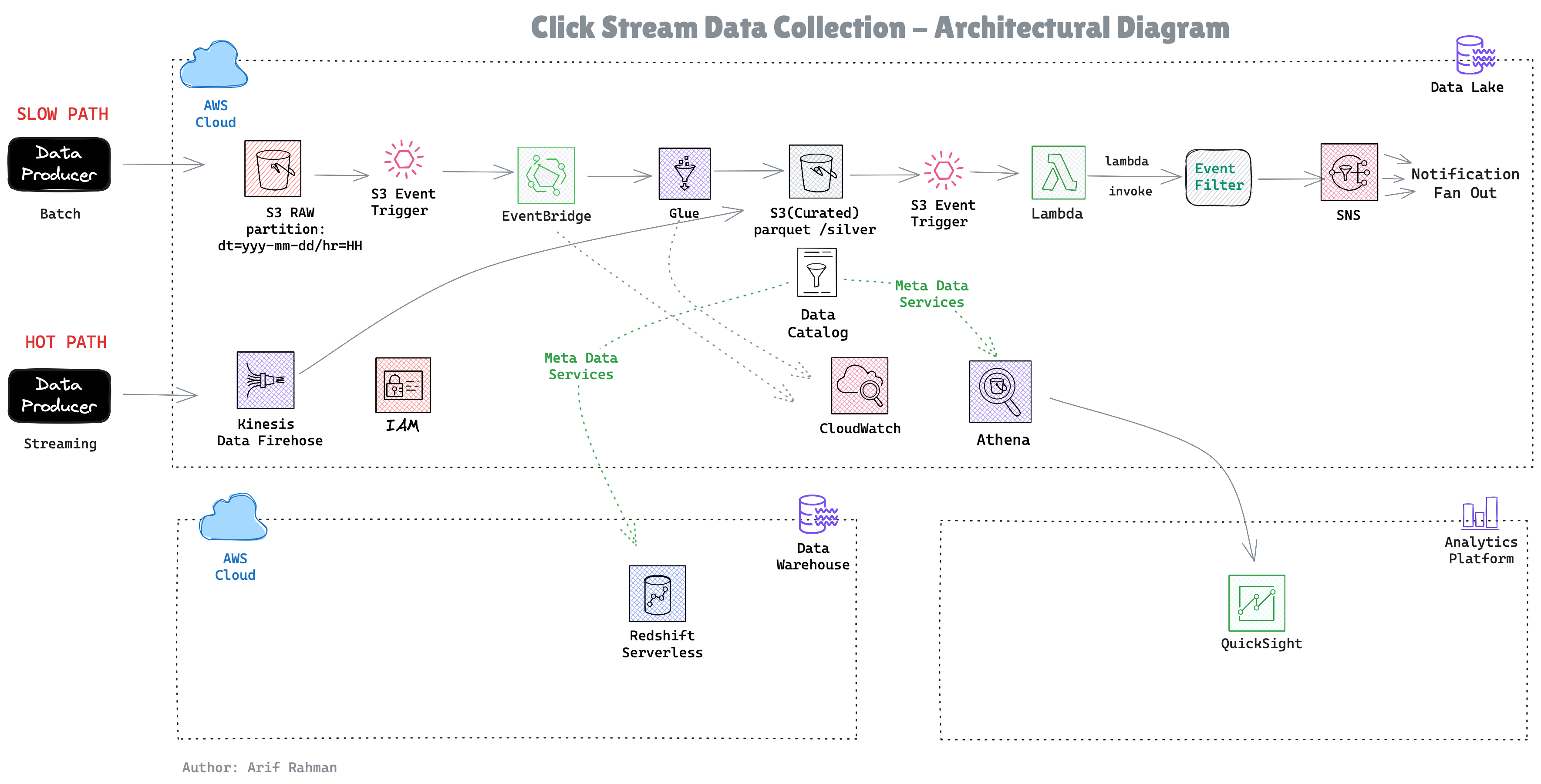
The components:
Storage: S3 as the data lake foundation
Cataloging: Glue Data Catalog for metadata
Processing: Glue ETL for transformations
Analytics: Redshift for BI, Athena for ad-hoc queries
Events: EventBridge + Lambda for real-time alerting
Let's dive into each piece and the decisions that shaped them.
How we built a scalable clickstream analytics pipeline that processes 500GB/day while cutting costs by 70%
You're a data engineer at a growing e-commerce company. Every hour, your web application generates millions of clickstream events—page views, add-to-carts, purchases. These land as JSON files in S3, and your business teams are demanding:
Sound familiar? Let me show you how we solved this with a modern AWS data pipeline.
Our solution follows a medallion architecture with four distinct layers:
The components:
Let's dive into each piece and the decisions that shaped them.
Raw data arrives at:
This year/month/day/hour structure isn't arbitrary—it's our first line of cost defense.
Why it matters:
Athena charges $5 per TB scanned. Without partitioning, querying one day of data means scanning the entire dataset. With partitioning, we scan only what we need:
95% cost reduction with one WHERE clause. That's the power of partitioning.
Instead of running crawlers or MSCK REPAIR TABLE to discover partitions, we use partition projection:
Now Athena automatically knows where to find data. No maintenance, zero lag. New files are immediately queryable.
We transform raw JSON into a star schema with fact_clicks and dim_users. Here's why:
The star schema advantage:
Compared to alternatives:
Our workload is 95% reads, 5% writes. Star schema optimizes for the common case.
Our Glue job does three critical things:
Data Quality Checks
Create Dimension Table (SCD Type 1)
Build Fact Table with Metrics
Output: Parquet files with Snappy compression. Why Parquet?
One query that convinced us:
Here's our controversial decision: We use both Redshift AND Athena.
Hot Data (0-30 days) → Redshift:
Warm Data (30-90 days) → Redshift Spectrum:
Cold Data (90+ days) → S3 Glacier:
Query pattern analysis:
We optimized for the 80% case and made the 5% case acceptable.
Before optimization (all in Redshift):
After optimization (hybrid):
Savings: $7,698/month (82%)
Business requirement: "Alert us immediately when someone makes a $1,000+ purchase."
Our solution: EventBridge + Lambda
Kinesis would give us true streaming, but:
Lambda gives us:
Simple, effective, and costs pennies.
Our initial architecture was expensive:
What we changed:
Redshift Reserved Instances (75% savings)
S3 Intelligent-Tiering (35% savings)
Glue Job Bookmarks (30% time savings)
Redshift Auto-Pause (Dev/Test)
Total savings: $7,000/month = $84,000/year
Start Simple, Optimize Later
We launched with:
This got us to production in 3 weeks. We added:
Partition Everything
Every table is partitioned by date. This single decision:
Measure Before Optimizing
We logged every query's execution time and scanned bytes. This data revealed:
Implement Data Quality Earlier
We had to backfill 2 weeks of data due to a schema mismatch. A simple validation would have caught it:
Use Terraform from the Start
We manually created resources initially. Big mistake. When we needed to replicate to staging, it took 2 days to document everything.
Now everything is code:
Spinning up new environments: terraform apply -var-file=staging.tfvars
Monitor Data Freshness
We once didn't notice data wasn't arriving for 6 hours. Now we have:
Alarm fires if lag > 90 minutes.
Before optimization:
After optimization:
Changes made:
Result: 37x faster, 90% less data scanned
Our most common query:
We materialized it:
Impact:
Layer 1: Network
Layer 2: Identity
Layer 3: Data
Layer 4: Audit
Handling deletion requests:
Challenge: Parquet is immutable. We have to rewrite entire partitions. For frequent deletions, consider Apache Iceberg or Delta Lake.
We track 5 key metrics:
Data Freshness
Current Time - Latest Partition Timestamp < 90 minutes ✓
ETL Success Rate
Successful Runs / Total Runs > 99.5% ✓
Query Performance (P95)
95th Percentile Query Duration < 5 seconds ✓
Cost per TB Processed
Monthly Cost / TB Processed < $50 ✓
Data Quality Score
Valid Records / Total Records > 95% ✓
Critical Alarms (page on-call):
ETL job failed
Data not arriving (90+ minute lag)
Redshift cluster unhealthy
Warning Alarms (Slack notification):
Query duration > P95 baseline
Cost spike (>20% daily budget)
Data quality score < 95%
Benefits:
Building a production data pipeline isn't about using the fanciest tools—it's about making smart trade-offs:
Serverless over self-managed (unless you have specific needs)
Partition everything (it's free performance)
Optimize for the common case (80/20 rule applies to data too)
Monitor what matters (data freshness > vanity metrics)
Start simple, iterate (perfect is the enemy of shipped)
Before:
Manual data exports for analysts
Week-old analytics
$15,000/month AWS bill
2 engineers full-time on data ops
After:
ROI: $143,000/year savings + countless analyst hours
Code:
https://gitlab.com/arif-rahman4/mini-data-pipeline
Questions? Reach out on https://www.linkedin.com/in/arif-rahman-da/
Tags: #DataEngineering #AWS #Analytics #BigData #CloudComputing